Playing around with Google Stitch
This week I spent some time using Google Stitch, an AI chat interface for product mock ups. There are a lot of these kind of products, Figma has one, so does Canva. Stitch is the first one I've used that is filling a real need for me. That need? Producing something I can copy paste into a requirements doc. Something that's better than a hand drawing as an alternative to paragraphs of text.
As I said, there are plenty of tools that promise to take your prompt and give you everything up to a working MVP. I have never wanted that functionality, especially in the context of a mature product. I don't need a react app, I need a somewhat useful UI mockup that I can add as a visual aid to some user requirements. I tried to do the same task in the Figma AI tool and got a complete React app out the other side. While that's impressive it is also pretty useless. It isn't enough on it's own and doesn't integrate with the existing product so all that code goes in the bin. All I wanted was the visuals.
I can understand why other providers built these tools, it is cool to make little demo apps from prompts. 'Little demo app' is usually where it ends though. You'll get a shell of your idea that you can click around a bit but your youtube clone isn't going to serve 4k video. Anyway, I am not here to bad mouth other products. They seem to be doing very will with their niche it's just not for me.
What I like about Stitch is that it spits out visuals. There's HTML, but most of my work with it has been extracting screenshots and pasting them into docs.
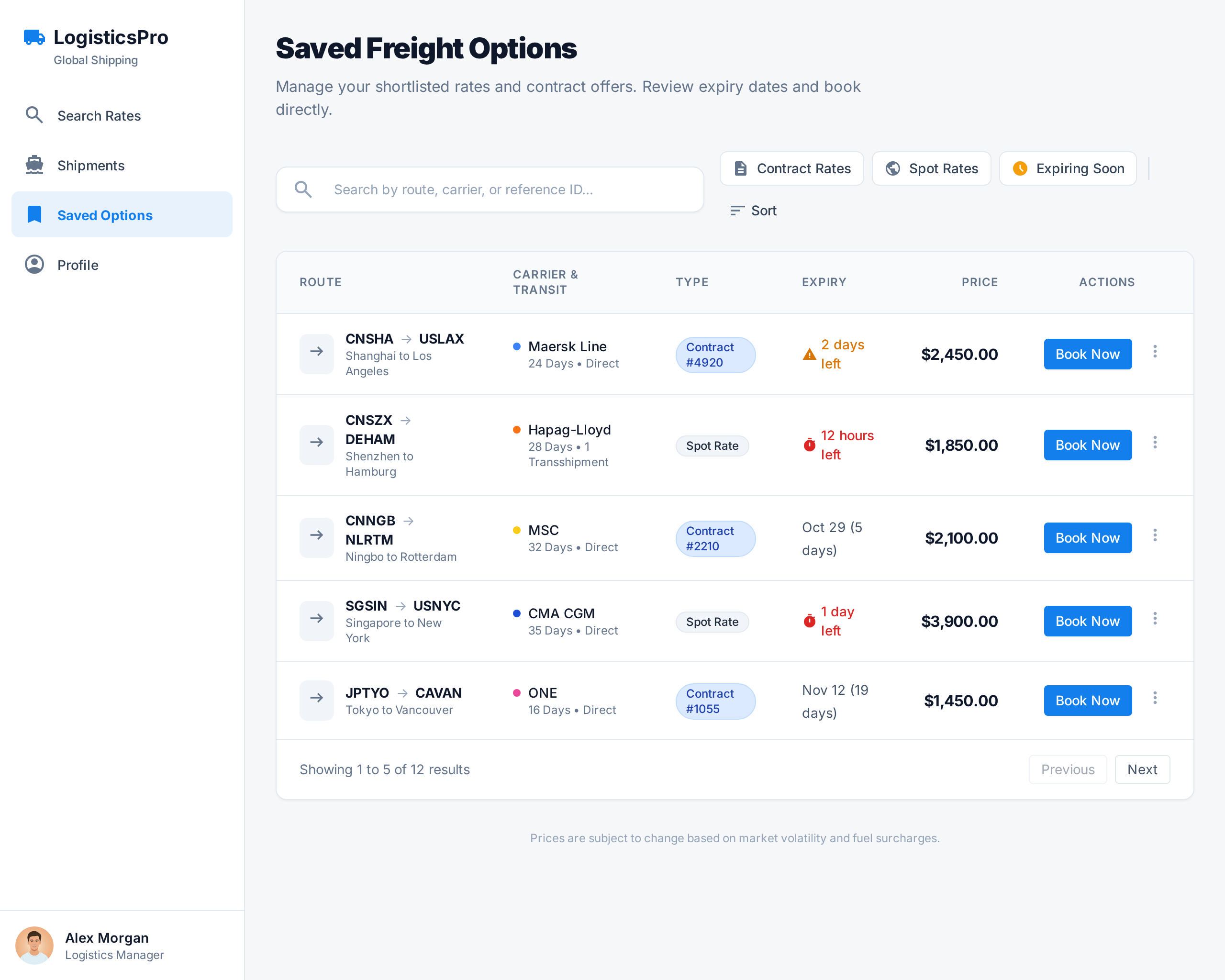
I've been careful to set expectations with the people on the receiving end of these images. They are there to replace what was previously a photo of a whiteboard. They're rough, indicative and high level. They'll go through a proper round of design if the project kicks off but they're not to be taken as detailed designs.
A few things I have found particularly neat:
It took my prompts and generated 3-4 images displaying a somewhat sensible workflow. I asked it to merge some of the steps into one unified UI and it managed to do that quite well.
I work in a logistics software company and it added terminology and concepts without them being in the prompt. There were mistakes but nothing unacceptable at a 'whiteboard sketch' level of detail.
You can select any image it has spit out so far and ask for refinements. I did this several times adding more features and removing ones I didn't need.
The images revealed how even a thought out description leaves a lot of room for ambiguity. The follow up prompts produced better images and made the written specifications clearer.
I uploaded a screenshot of our existing product and asked it to match the style. It wasn't perfect but it did a fairly good job.
Right now, it's free (with some monthly limits).